

How solid-state internals change the game
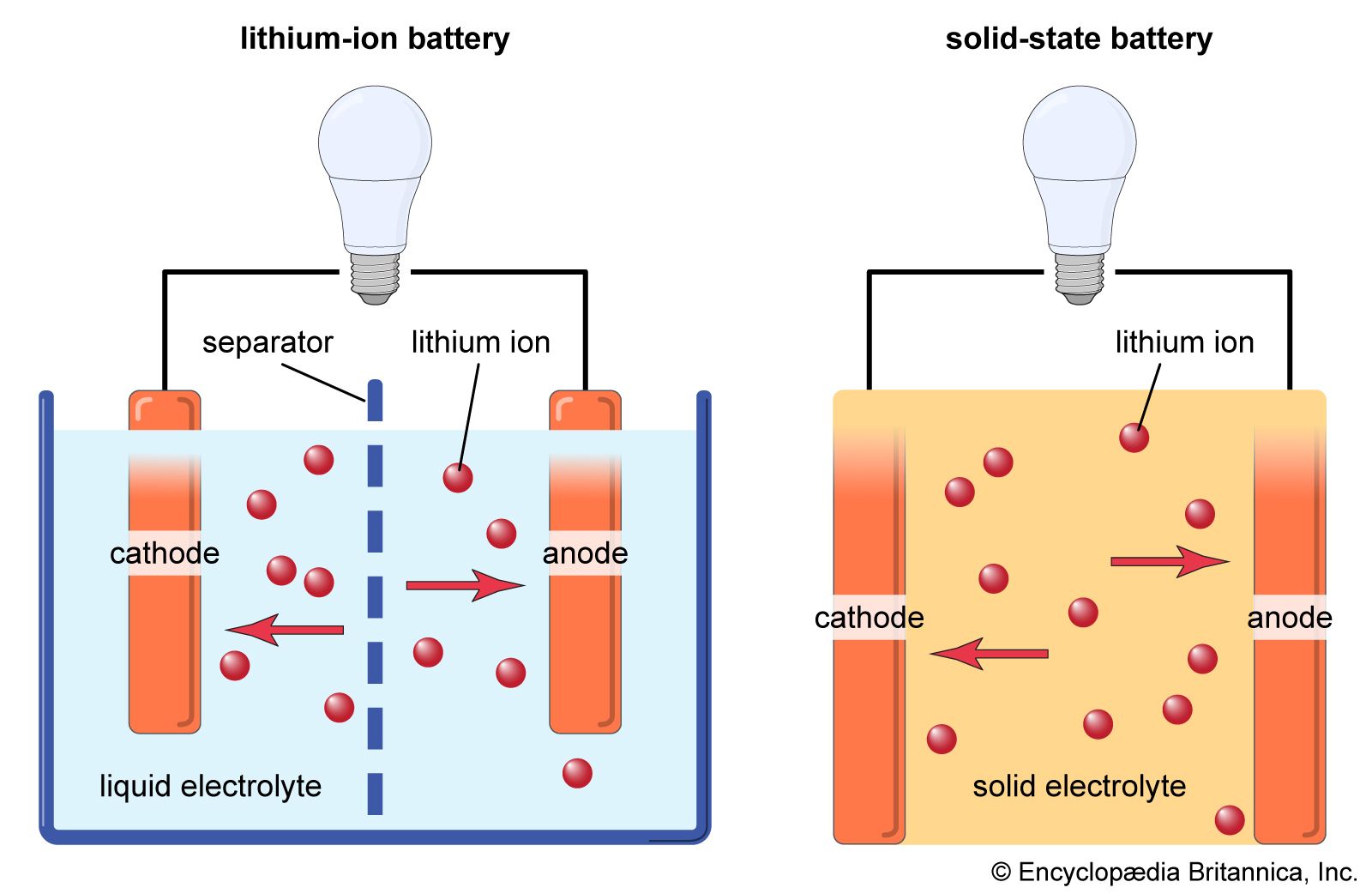
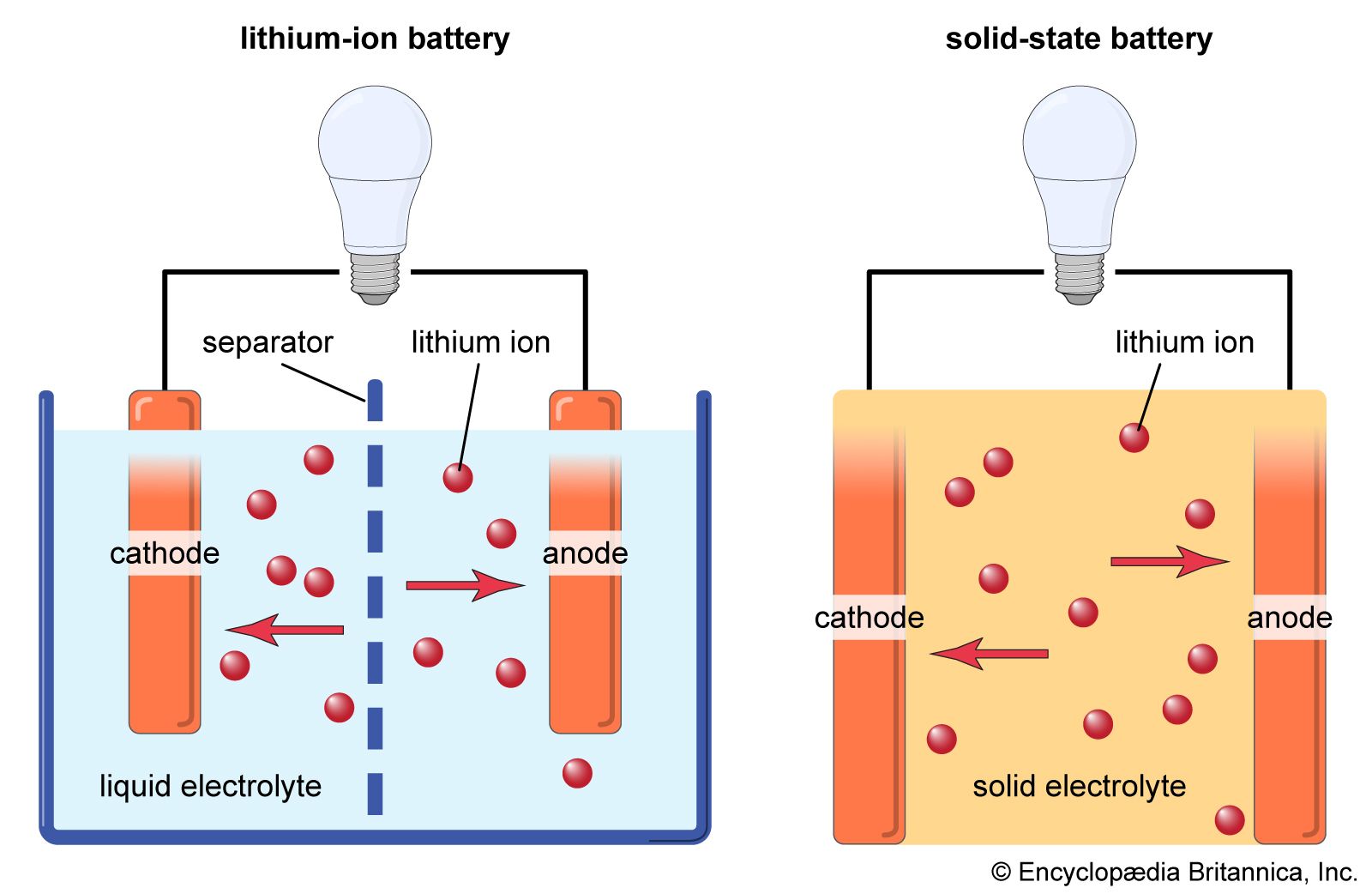
Solid-state batteries swap the liquid electrolyte found in standard lithium-ion cells for a solid material. This change in the internal path for ions alters how the battery handles heat and wear, which means we have to change how we look after them.
The benefits are compelling. Solid-state batteries promise higher energy density, meaning more power packed into the same size. They’re also inherently safer, less prone to leaks or thermal runaway, and potentially offer a longer lifespan. But it’s important to understand that 'maintenance' with solid-state batteries isn’t about the same things as with lead-acid or even lithium-ion. It’s a different beast entirely, focused more on preventative measures and system optimization than direct component upkeep.
The internal architecture is compact because the solid electrolyte removes the need for the bulky separators used in liquid cells. While this makes the battery denser and safer, it also means the old diagnostic tools we use for liquid batteries are mostly obsolete.
Heat is the main enemy
Solid-state batteries are more sensitive to temperature fluctuations than their lithium-ion counterparts. While lithium-ion batteries perform best within a fairly wide temperature range, solid-state batteries have a narrower optimal operating window. Exceeding these limits – whether from excessive heat or extreme cold – can accelerate degradation and reduce overall lifespan. Maintaining a consistent, moderate temperature is absolutely critical.
Vehicle thermal management systems, already sophisticated in electric cars, become even more important with solid-state batteries. These systems utilize coolant loops, heat pumps, and other technologies to regulate battery temperature. Proper functioning of these systems is non-negotiable. A failure in the cooling system, for example, could lead to a rapid temperature increase, potentially causing irreversible damage to the battery.
The nature of that damage differs from a lithium-ion failure. With lithium-ion, overheating often leads to thermal runaway – a cascading exothermic reaction resulting in fire. Solid-state batteries are less prone to this catastrophic failure mode, but prolonged exposure to high temperatures can still cause cracking within the solid electrolyte, increasing internal resistance and reducing performance. It is a more subtle failure, but no less impactful.
Charging Protocols: Slow and Steady
The convenience of fast charging has become a hallmark of electric vehicles, but this practice isn’t ideal for solid-state batteries. The rapid influx of ions during fast charging can create stress within the solid electrolyte, leading to the formation of microscopic cracks and accelerating degradation. A slower, more controlled charging rate is generally recommended. I’m not sure about the exact optimal charging rates yet, as they vary depending on the specific battery chemistry and design, but the principle remains the same.
Exceeding the recommended charging rate can significantly reduce the long-term lifespan of a solid-state battery. Think of it like bending a paperclip repeatedly – eventually, it will weaken and break. Similarly, forcing ions into the solid electrolyte too quickly can cause structural damage over time. The goal is to allow the ions to move freely and evenly without creating undue stress.
The Battery Management System (BMS) is the brain of the pack. It watches voltage and temperature to adjust the charging speed in real-time. Keeping the software updated via over-the-air patches is the easiest way to ensure the battery doesn't cook itself during a charge cycle.
- Use chargers built for solid-state chemistry.
- Skip fast charging when you aren't in a rush.
- Monitor battery temperature during charging.
- Follow the manufacturer’s recommended charging guidelines.
State of Charge Habits
Unlike older battery chemistries where deep discharges were often tolerated, maintaining a moderate state of charge (SoC) seems to be more beneficial for solid-state batteries. Repeatedly draining the battery to very low levels (high Depth of Discharge or DoD) can put stress on the solid electrolyte. A sweet spot between 20% and 80% SoC appears to maximize lifespan, although this is still an area of ongoing research.
It’s helpful to understand the concepts of "calendar aging’ and ‘cycle aging." Calendar aging refers to the natural degradation that occurs over time, regardless of usage. Cycle aging is the degradation caused by repeated charging and discharging. Solid-state batteries appear to be less susceptible to calendar aging than lithium-ion, but cycle aging remains a factor, and is influenced by the DoD.
I want to be cautious about overstating the benefits. While early data suggests improved longevity with moderate SoC, the specific impact varies depending on the solid electrolyte material and battery design. It’s not a one-size-fits-all situation. The key is to avoid extremes – both fully charging and fully discharging the battery frequently.
Software & BMS Updates
Solid-state battery performance is heavily reliant on sophisticated Battery Management System (BMS) software. The BMS doesn’t just monitor the battery; it actively manages its operation, optimizing charging, discharging, and thermal control. Keeping the BMS updated with the latest firmware is therefore crucial for maintaining optimal battery health and performance.
Updates can improve charging algorithms, making them more tailored to the specific characteristics of the battery. They can also refine thermal management strategies, ensuring the battery operates within its ideal temperature range. Furthermore, updates can address potential security vulnerabilities and improve overall system stability. These aren’t simply 'nice-to-haves,' they’re essential for maximizing the battery’s lifespan.
The potential for over-the-air (OTA) updates is a significant advantage. This allows manufacturers to remotely deploy improvements and fixes without requiring a visit to a service center. However, OTA updates also raise security concerns, as a compromised BMS could potentially be exploited. Robust security protocols are essential to mitigate these risks.
Physical Handling & Storage
While solid-state batteries are generally more robust and less prone to catastrophic failure than lithium-ion batteries, they aren’t indestructible. Best practices for handling and storage still apply. Avoid dropping or subjecting the battery to significant physical shock or vibration, as this could potentially damage the solid electrolyte.
Ideal storage conditions include a cool, dry environment with a moderate temperature. Extreme temperatures – both hot and cold – should be avoided. The battery should also be stored at a partial state of charge, around 50%, to minimize degradation during prolonged storage. Humidity should also be controlled, as excessive moisture can potentially corrode internal components.
It’s easy to assume that because solid-state batteries are safer, they require less care. That’s simply not true. They’re differently safe, meaning the failure modes are different, and the preventative measures need to reflect that. Careful handling and proper storage are still essential for maximizing lifespan and ensuring reliable performance.
Warning signs to track
Even with diligent maintenance, solid-state batteries can experience issues. Common warning signs include unusual temperature fluctuations, a noticeable decrease in range, prolonged charging times, or error messages displayed by the BMS. These symptoms don’t necessarily indicate a catastrophic failure, but they warrant further investigation.
If you observe any of these symptoms, the first step is to consult the vehicle or device’s owner’s manual. It may provide specific troubleshooting steps or recommend contacting a qualified service technician. Avoid attempting DIY repairs, as this could potentially void the warranty or cause further damage. Solid-state battery systems are complex, and specialized knowledge is required for proper diagnosis and repair.
It's important to remember that the BMS is your primary diagnostic tool. Pay attention to any error codes or warnings it displays. These codes can provide valuable clues about the nature of the problem. A professional technician will use specialized equipment to further diagnose the issue and determine the appropriate course of action.
Solid-State Battery Issue Diagnosis
| Symptom | Possible Cause | Severity | Recommended Action |
|---|---|---|---|
| High Temperature | Increased internal resistance, exceeding optimal operating range | High | Allow battery to cool. Investigate cooling system functionality. Reduce load if possible. |
| Reduced Range | Degradation of solid electrolyte, increased impedance | Medium | Monitor performance closely. Adjust driving habits to minimize strain. Professional diagnostic check recommended. |
| Slow Charging | Interface resistance issues between electrode and electrolyte | Medium | Verify charger compatibility and functionality. Inspect charging port for obstructions. Professional assessment advised. |
| BMS Error Message | Communication error within the Battery Management System, potential cell imbalance | High | Immediately consult a qualified technician for BMS diagnostics and potential recalibration. |
| Voltage Drop During Discharge | Localized impedance increase within the solid-state cell | Medium | Monitor discharge curve. Reduce load and seek professional evaluation. |
| Inconsistent State of Charge (SOC) readings | Potential issues with current sensing within the BMS or cell-level variations | Medium | Check BMS calibration. Monitor SOC across multiple charge/discharge cycles. |
| Increased Internal Resistance | Dendrite formation (though less common in solid-state), electrolyte degradation | High | Professional diagnostic check required. Battery replacement may be necessary. |
Illustrative comparison based on the article research brief. Verify current pricing, limits, and product details in the official docs before relying on it.
No comments yet. Be the first to share your thoughts!